Prompt Development
Teaching AI How to Screen Abstracts
Using AI for systematic review screening is not as simple as asking a model to decide whether a study should be included or excluded. The way the task is written — the prompt — changes how the model behaves.
In this prototype, prompt development became part of the research method. We tested different ways of asking AI to screen abstracts and learned that the model’s decisions depended heavily on how we framed the task.
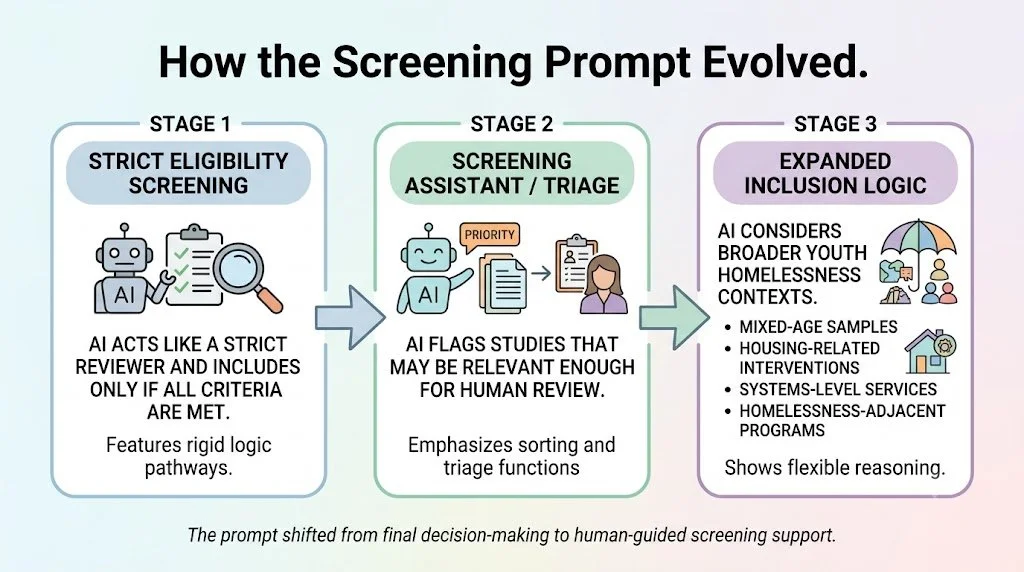
The prompt development process moved through three stages:
First, we asked AI to act like a strict systematic review screener.
Then, we reframed AI as a screening assistant.
Finally, we expanded the prompt so AI could better recognize studies that were relevant but described in indirect or broader language.
The final prompt from Phase 1 (studies from 2008-2017) was then used in Phase 2 to screen newer studies from 2018–2025.
Step 1: Starting with Strict Eligibility Screening
-
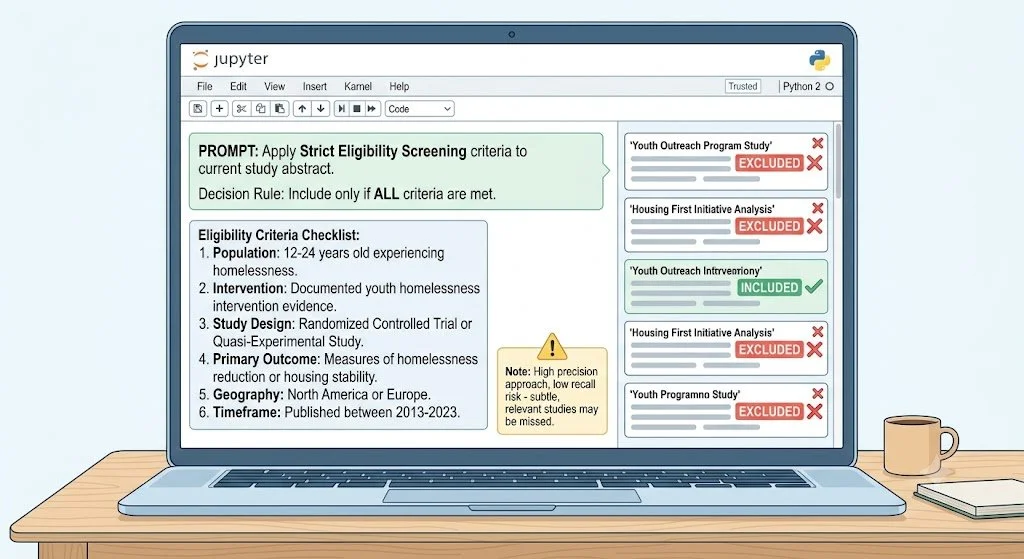
The first approach asked AI to behave like a strict systematic review screener. The model was asked to evaluate several eligibility criteria and include a study only when all criteria appeared to be satisfied.
This approach treated abstract screening almost like final eligibility review.
-
This example is simplified for website readers. See the Python notebooks for the full prompt used in the analysis.
“You are an expert systematic review screener. Your task is to determine whether the following study should be included in a review of youth homelessness interventions.
Evaluate whether the study meets all eligibility criteria: youth ages 13–25, homelessness or housing instability, OECD country context, intervention or service relevance, empirical research, and evidence related to effectiveness or implementation.
Include the study only if all criteria are met. Otherwise, exclude the study and provide the reason.”
-
This approach was too strict for title and abstract screening. Abstracts often do not provide enough information to confirm every eligibility criterion. A study may be relevant, but the abstract may not clearly report the age range, housing status, intervention structure, study design, country, or outcomes.
Because the model had to confirm many criteria at once, it became conservative. It missed too many studies that human reviewers would have kept for full-text review.
In the workflow slides, this first strategy is described as a “hard AND-gate” decision rule: the study is included only if all criteria are satisfied. This structure produced high precision but low recall, meaning that when the model included a study it was often correct, but it missed many relevant studies.
-
This first attempt showed that AI should not be asked to make final inclusion decisions when it only sees titles and abstracts. The prompt needed to better match the actual purpose of abstract screening: identifying studies that may deserve human review.
Step 2: Reframing AI as a Screening Assistant
-
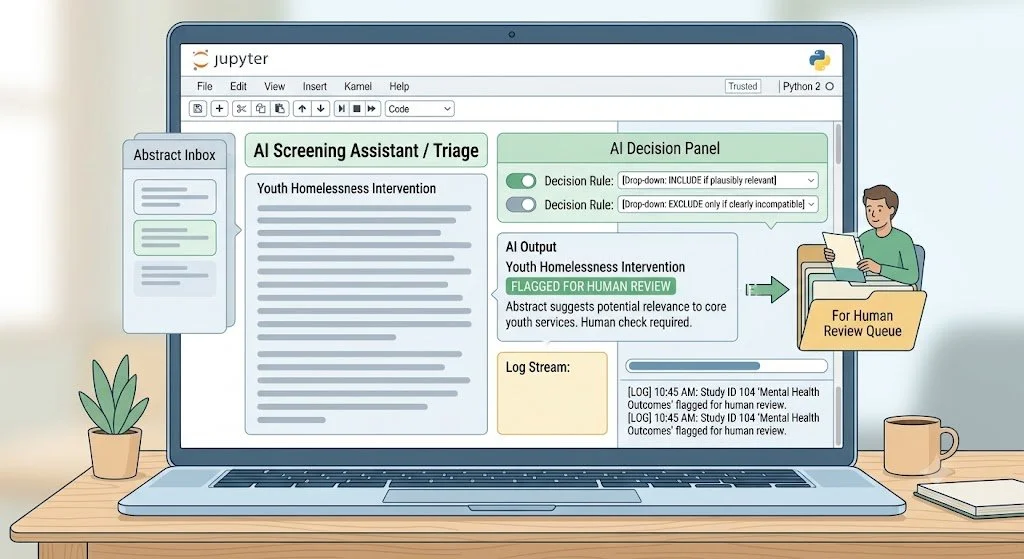
The second approach reframed the AI’s role. Instead of acting as a final decision-maker, AI was asked to act as a screening assistant.
The task became less about deciding whether a study definitely belonged in the review and more about deciding whether the study was potentially relevant enough to move forward for human review.
-
This example is simplified for website readers. See the Python notebooks for the full prompt used in the analysis.
“You are assisting with title and abstract screening for a systematic review of youth homelessness interventions.
Your task is to identify studies that are potentially relevant and should move forward for human review.
Include the study if it appears to involve youth or young people, homelessness or housing instability, an intervention or service, and empirical research.
If the abstract is ambiguous but plausibly relevant, include it for human review. Exclude only if it is clearly not relevant.”
-
This approach better reflected how human reviewers often work at the title and abstract stage. Reviewers are usually not trying to make final decisions from abstracts alone. They are deciding whether a study is worth reviewing in full.
This reframing reduced the number of strict criteria and placed more emphasis on avoiding false negatives. In the workflow, this prompt reduced the decision rule from eight criteria to a smaller set of core screening signals: youth, possible homelessness, some intervention, and empirical research.
-
This approach helped AI behave more like a triage tool. However, some relevant studies were still missed because they did not use obvious youth homelessness intervention language.
That led to the third stage: expanding what the prompt should recognize as potentially relevant.
Step 3: Expanding What Counts as Potentially Relevant
-
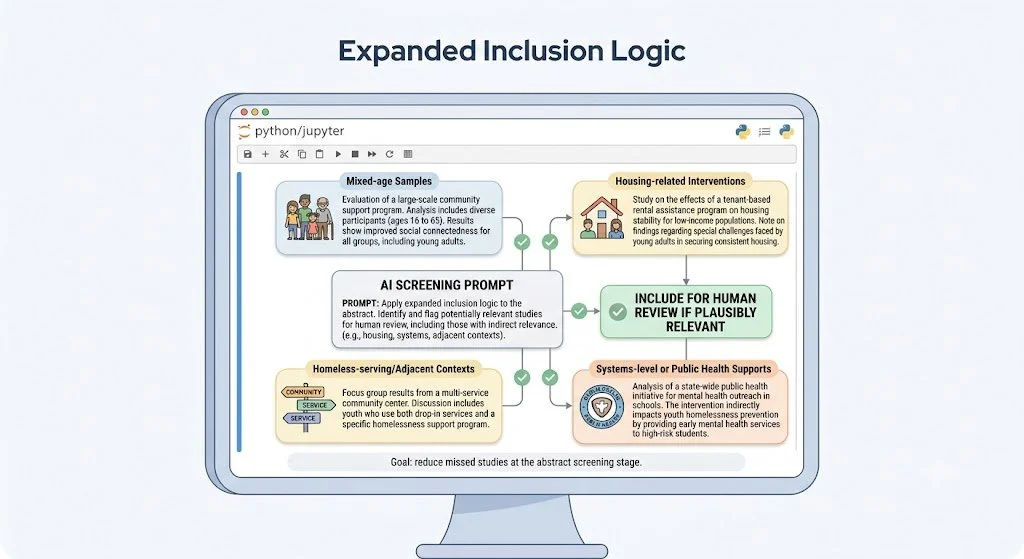
After comparing AI decisions with human screening decisions, we examined studies that human reviewers considered relevant but AI missed. These missed cases showed that relevant youth homelessness intervention research can be described in many ways.
Some studies involved mixed-age samples where youth were likely included. Some focused on housing-related interventions even when housing was not the only outcome. Others involved broader public health interventions, systems-level services, or programs delivered in homeless-serving contexts.
In other words, relevant studies did not always say “youth homelessness intervention” directly.
-
The final prompt expanded the AI’s interpretation of relevance. The model was instructed to include studies that plausibly intersected with youth homelessness populations, services, systems, or risk pathways, even when the abstract did not perfectly match every criterion.
-
This example is simplified for website readers. See the Python notebooks for the full prompt used in the analysis.
“You are assisting with abstract screening for a systematic review of youth homelessness interventions.
Your goal is to minimize missed studies and identify abstracts that may be relevant enough for human review.
Include the study if it plausibly relates to youth homelessness interventions, including studies involving mixed-age samples, housing-related interventions, homelessness-adjacent services, broader public health interventions delivered in homeless-serving contexts, or systems-level supports connected to homelessness.
Exclude only if the study is clearly unrelated to youth homelessness populations, interventions, services, or relevant systems of support.”
-
This final approach changed the decision boundary.
Instead of asking:
Does this abstract clearly meet every criterion?
the prompt asked:
Is this abstract plausible enough to deserve human review?
That framing was better suited to a living systematic review workflow, where the goal is to avoid missing potentially relevant evidence during early screening. In the workflow slides, this final strategy is described as an expanded inferential approach designed to maximize recall and reduce false negatives.
Beginner-Friendly Workflow
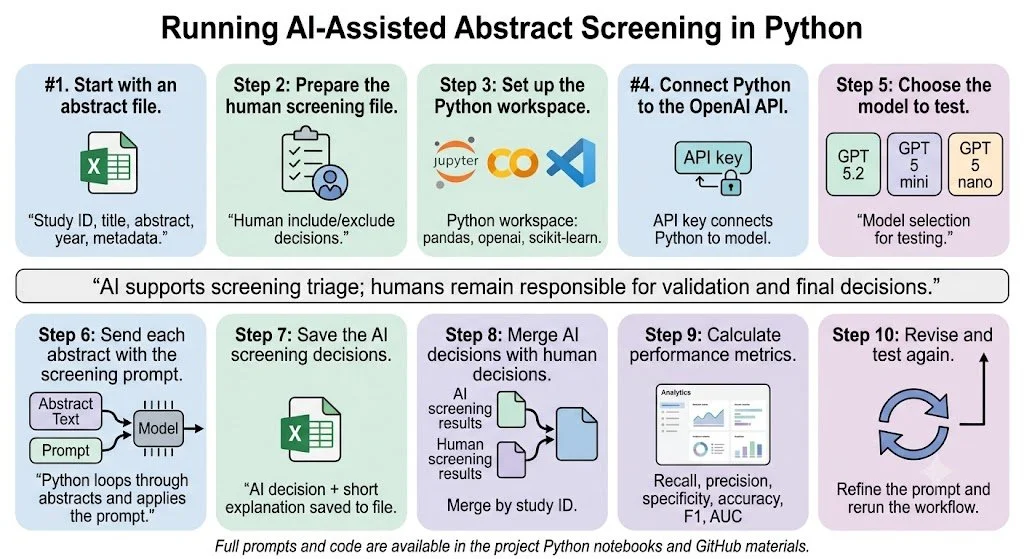
This project used Python and the OpenAI API to apply screening prompts to study abstracts. For readers who are not familiar with Python, the process can be understood like a structured workflow: a spreadsheet of abstracts goes into the system, the AI applies the screening prompt to each abstract, and a new spreadsheet comes out with AI screening decisions.
The purpose of using Python was not to make the review more technical for its own sake. It allowed the team to apply the same prompt consistently across many abstracts, save the AI’s decisions in a structured format, and compare those decisions with human screening decisions.
The documented implementation used GPT, 4o, GPT 5.2, GPT 5 mini, and GPT 5 nano as model options for testing AI-assisted abstract screening. The same workflow can also be adapted to other models by replacing the model name in the Python code. The full prompts, API calls, file names, and model settings are available in the project’s Python notebooks and GitHub materials. The prompt examples shown on this website are simplified examples for explanation, not the full prompts used in the analysis.
Start with an abstract file
The review team begins with a spreadsheet or CSV file. Each row represents one study record. The file usually includes information such as the study ID, title, abstract, publication year, and other available metadata.
In plain language, this is the file that tells the AI:
“Here are the studies we want you to screen.”
2. Prepare the human screening file
A separate file contains the human reviewers’ screening decisions. These decisions are important because they serve as the comparison point for evaluating AI performance.
In plain language, this file tells us:
“Here is how trained human reviewers screened these studies.”
3. Set up the Python workspace
Python is the workspace used to run the process. The workflow can be run in tools such as Jupyter Notebook, Google Colab, or VS Code.
For nontechnical users, this can be understood as the place where the instructions are organized and run. Python reads the abstract file, sends each abstract to the AI model, receives the AI decision, and saves the result.
4. Connect Python to the OpenAI API
The OpenAI API is the connection between Python and the AI model. An API key allows Python to send the abstract and prompt to the selected model.
In plain language, the API key works like a secure access pass. It allows the Python notebook to communicate with the AI model.
5. Choose the model to test
The model is the AI system that reads the prompt and abstracts. In this project, the documented workflow used GPT, 4o, GPT 5.2, GPT 5 mini, and GPT 5 nano as model options for testing.
Different models can be compared to see whether they produce different screening performance. The model name can be changed directly in the Python code.
6. Send each abstract with the screening prompt
Python goes through the abstract file one row at a time. For each study, it combines the screening prompt with the study title and abstract, then sends that information to the AI model.
In plain language, this step asks the AI:
“Based on this prompt, should this abstract be included for human review or excluded?”
7. Save the AI screening decisions
After the AI screens each abstract, Python saves the output into a new file. This file may include the AI’s include/exclude decision and a short explanation.
This creates a structured AI screening dataset that can be reviewed, audited, and compared with human screening.
8. Merge AI decisions with human decisions
The AI screening file is then merged with the human screening file using a shared study ID. This allows the team to compare AI and human decisions for each study.
In plain language, this step asks:
“Where did AI agree with humans, and where did it disagree?”
9.Calculate performance metrics
Python then calculates performance metrics such as recall, precision, specificity, accuracy, F1 score, and AUC. These metrics help the team understand whether the AI prompt is useful for screening.
For this project, recall was especially important because the goal of abstract screening is to avoid missing studies that may be relevant. A high-recall prompt helps identify more studies that human reviewers may want to examine further.
10.Revise and test again
If the AI misses too many relevant studies, the prompt can be revised and tested again. This is why prompt development is part of the method. The team can change the screening instructions, rerun the workflow, and compare whether the new prompt performs better.
In this prototype, this process helped move the prompt from strict eligibility screening toward a more useful triage approach for human review.